
Introduction to User Experience Basics
In today’s digital world, user experience basics form the foundation of successful online interactions. Whether you browse a website, use an app, or shop online, the way you feel during that process matters a lot. User experience, often called UX, focuses on making these moments easy, enjoyable, and effective. This guide dives into the basics of UX to help you understand why it counts and how to apply it.
Think about the last time you visited a site that loaded quickly, had clear buttons, and guided you right to what you needed. That positive feeling? That’s good UX at work. On the flip side, confusing menus or slow pages can frustrate you and make you leave. By mastering user experience basics, designers, developers, and business owners create products that keep people coming back. We will explore definitions, principles, processes, and real-world tips to get you started.
What Is User Experience?
refers to how people feel when they interact with a product or service, especially digital ones like websites or apps. It covers everything from the first click to the final action. Don Norman, a pioneer in the field, defines UX as encompassing all aspects of a user’s interaction with a company, its services, and its products. This includes not just the interface but also the emotions, ease, and overall satisfaction.
At its core, UX aims to meet user needs while aligning with business goals. It draws from fields like psychology, design, and technology to create seamless journeys. For example, in a mobile banking app, good UX means quick logins, simple transfers, and helpful error messages if something goes wrong. Poor UX might involve hidden fees or complicated navigation, leading to user drop-off.
To break it down further:
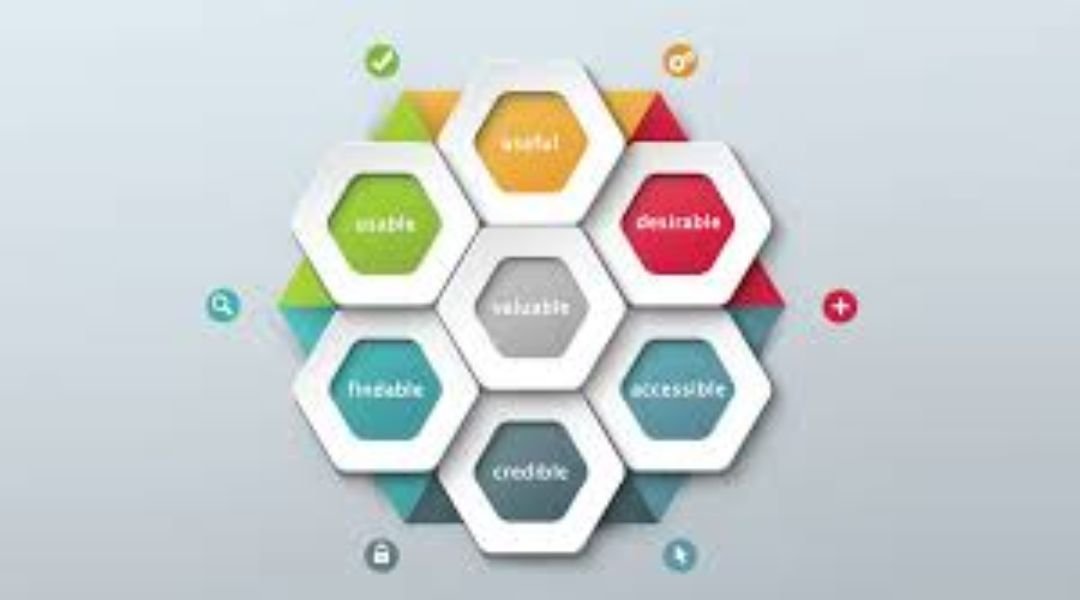
- Usability: How easy is it to use?
- Accessibility: Can everyone, including those with disabilities, access it?
- Desirability: Does it appeal emotionally and visually?
- Value: Does it solve real problems?
Understanding these elements helps build better products. Businesses that prioritize UX see higher engagement and loyalty.
The History of User Experience
The basics of user experience didn’t start with smartphones or the internet. They trace back to early human-tool interactions. In the 1940s, during World War II, engineers studied how pilots interacted with cockpit controls to reduce errors. This field, called human factors engineering, laid the groundwork for modern UX.
In the 1970s, Xerox PARC researchers developed graphical user interfaces (GUIs) with mice and windows, making computers more intuitive. Don Norman joined Apple in the 1990s and coined the term “user experience” to describe a broader focus beyond just usability. His book, “The Design of Everyday Things,” became a staple for designers.
The 2000s brought the web boom, where sites like Amazon and Google emphasized simple, fast experiences. Today, with mobile devices dominating, UX evolves with AI, voice interfaces, and personalization. Knowing this history shows how UX has always been about putting people first.
Why User Experience Matters
Good drives success in digital products. Studies show that 88% of online consumers are less likely to return to a site after a bad experience. On the positive side, companies with strong UX outperform competitors by up to 400% in stock performance.
Why does it matter? Users have choices. If your app confuses them, they switch to another. UX builds trust, reduces support costs, and boosts conversions. For businesses, it means higher retention—users who enjoy your product share it with others, creating free marketing.
In e-commerce, for instance, smooth checkout processes can increase sales by 35%. In healthcare apps, clear designs help patients manage their health better, improving outcomes. Ignoring UX leads to high bounce rates and lost revenue. Prioritizing it creates loyal fans and sustainable growth.
Key Principles of User Experience Basics
Mastering starts with core principles. These guidelines ensure designs are intuitive and effective. Jakob Nielsen’s 10 usability heuristics provide a solid framework. Let’s break them down into simple, actionable steps.
- Visibility of System Status: Keep users informed. Use progress bars during loads or confirmations after actions. This reassures users and reduces anxiety.
- Match Between System and Real World: Speak the user’s language. Use familiar icons, like a trash can for delete, and organize content logically, as in a shopping cart mimicking a real one.
- User Control and Freedom: Let users undo mistakes. Provide “back” buttons or edit options to give a sense of control.
- Consistency and Standards: Maintain uniformity. Buttons should look and work the same across pages to avoid confusion.
- Error Prevention: Stop problems before they happen. Use form validations, like checking email formats, to guide correct inputs.
- Recognition Rather Than Recall: Make info visible. Show recent searches or auto-fill forms so users don’t remember everything.
- Flexibility and Efficiency of Use: Cater to all levels. Offer shortcuts for experts while keeping basics simple for beginners.
- Aesthetic and Minimalist Design: Keep it clean. Remove clutter to focus on what matters, using white space for better readability.
- Help Users Recognize, Diagnose, and Recover from Errors: Use plain language in messages. Say “Invalid password—try again” instead of cryptic codes.
- Help and Documentation: Provide easy access to support. Include tooltips or FAQs without overwhelming the interface.
Applying these principles creates reliable experiences. For example, Netflix uses visibility with loading indicators and consistency in its menu across devices.
Elements of User Experience
Jesse James Garrett outlined five planes of UX, building from abstract to concrete. These elements help structure designs.
- Strategy Plane: Define user needs and business objectives. Research who your users are and what they want.
- Scope Plane: List features and content. Prioritize must-haves like search functions.
- Structure Plane: Organize information. Create sitemaps and user flows for logical navigation.
- Skeleton Plane: Design the layout. Use wireframes to place buttons, images, and text.
- Surface Plane: Add visuals. Choose colors, fonts, and images for appeal.
Each plane builds on the last, ensuring a cohesive product. In practice, an e-learning platform might start with strategy (student needs), then scope (course lists), and end with a clean surface (engaging videos).
The UX Design Process: Step-by-Step
Creating great UX follows an iterative process. Here’s how to approach it in five steps, inspired by design thinking.
- Empathize: Understand users. Conduct interviews, surveys, and observe behaviors. Tools like Google Analytics reveal pain points.
- Define: Identify problems. Create user personas—fictional profiles like “Busy Mom Sarah” who needs quick recipes.
- Ideate: Brainstorm solutions. Sketch ideas, hold workshops, and think creatively without limits.
- Prototype: Build mockups. Use tools like Figma for low-fidelity wireframes, then high-fidelity designs.
- Test and Iterate: Gather feedback. Run usability tests, analyze results, and refine. Repeat as needed.
This process ensures user-centered outcomes. For instance, Airbnb iterated on their search feature based on user tests, improving bookings.
UX vs. UI: Clearing the Confusion
People often mix up UX and UI, but they differ. User experience covers the entire journey, while user interface (UI) focuses on visuals and interactions.
UX asks: Does the product solve problems efficiently? UI asks: Do the buttons look good and respond well?
In a weather app, UX involves accurate forecasts and easy city switches. UI includes colorful icons and smooth animations. Both matter, but UX drives the strategy, and UI executes it. As Don Norman says, great products integrate all stages seamlessly.
Tools for Mastering User Experience Basics
To apply user experience basics, use the right tools. Here’s a list of essentials for different stages.
- Research Tools: SurveyMonkey for feedback, Hotjar for heatmaps showing user clicks.
- Prototyping Tools: Figma or Adobe XD for creating interactive mockups.
- Testing Tools: UserTesting for remote sessions, where real people try your design.
- Analytics Tools: Google Analytics to track bounce rates and session times.
- Collaboration Tools: Miro for virtual whiteboards during ideation.
Start with free versions to practice. These tools make UX accessible, even for small teams.
Common UX Mistakes and How to Avoid Them
Even experts make errors in user experience. Avoid these traps for better results.
- Ignoring Mobile Users: Many forget responsiveness. Fix it by testing on devices and using media queries in code.
- Overloading Features: Too many options confuse. Prioritize with user research and minimal viable products (MVPs).
- Skipping Feedback: Assuming what users want leads to fails. Always test early and often.
- Poor Onboarding: New users get lost. Use guided tours or tooltips to welcome them.
- Slow Performance: Delays frustrate. Optimize images and code for faster loads.
By spotting these, you create smoother experiences. For example, Cleeng improved navigation with tooltips, increasing page visits by 75%.
Real-World Examples of User Experience Basics
Let’s look at successful applications of user experience basics.
- Google Search: Simple interface, fast results, and predictive text make it effortless. It matches real-world expectations with plain language.
- Spotify: Personalized playlists and easy navigation keep users engaged. They use data to anticipate needs.
- Amazon: One-click buying and recommendations reduce friction, boosting sales.
Bad examples include outdated government sites with complex forms, leading to high abandonment. Learning from both helps refine your approach.
For more insights on web usability, check out [this guide on UX fundamentals](https://www.matrixinternet.ie/the-basics-of-user-experience-pt-1-web-usability/#:~:text=The%20Importance%20User%20Experience%20(UX,emotional%20impact%20of%20the%20interaction.).
Best Practices for Improving User Experience
Follow these tips to elevate your UX game.
- Conduct User Research Regularly: Use interviews and analytics to stay updated on needs.
- Focus on Accessibility: Add alt text for images and keyboard navigation for all users.
- Use Visual Hierarchy: Bold important elements and use colors to guide eyes.
- Personalize Experiences: Tailor content based on user data, like Netflix recommendations.
- Measure and Optimize: Track metrics like Net Promoter Score (NPS) and iterate.
Implementing these builds trust. Resources like Elementor’s UX basics blog offer more practical advice.
How to Measure User Experience Success
You can’t improve what you don’t measure. Key metrics include:
- Satisfaction Scores: NPS or CSAT surveys ask “How likely are you to recommend?”
- Usability Metrics: Task success rate, time on task, and error rate from tests.
- Engagement Metrics: Bounce rate, session duration, and conversion rates.
- Behavioral Data: Heatmaps show where users click or scroll.
Tools like Userpilot help with session replays to spot issues. Aim for benchmarks: Under 40% bounce rate signals good UX.
The Future of User Experience
User experience basics will evolve with technology. AI-driven personalization, like chatbots predicting needs, is rising. Voice interfaces from Alexa to Siri demand hands-free designs. Augmented reality (AR) in apps like IKEA’s furniture preview adds immersion.
Privacy concerns push ethical UX, with clear data consents. Inclusive design for diverse users, including AI bias checks, gains importance. Stay ahead by learning from platforms like Userpilot’s UX guide.
For broader digital news, visit Press World UK.
Frequently Asked Questions About User Experience Basics
What are the user experience basics for beginners?
Start with understanding user needs, applying Nielsen’s principles, and testing designs. Focus on simplicity and feedback.
How do user experience basics differ from UI design?
UX covers the whole journey, while UI handles visuals. Both are essential but serve different roles.
Why should I learn user experience basics?
It improves product success, user satisfaction, and business growth. Ignoring it risks losing users to competitors.
What tools help with user experience basics?
Use Figma for prototypes, Hotjar for insights, and Google Analytics for metrics.
How can I apply user experience basics to my website?
Conduct audits, simplify navigation, and gather user feedback regularly.
Conclusion
In summary, user experience basics revolve around creating intuitive, enjoyable interactions that meet user needs and drive success. From principles like visibility and consistency to processes involving research and testing, applying these foundations leads to better products. Remember, good UX isn’t a one-time effort—it’s ongoing iteration based on real feedback.
What aspect of user experience basics will you tackle first in your next project?